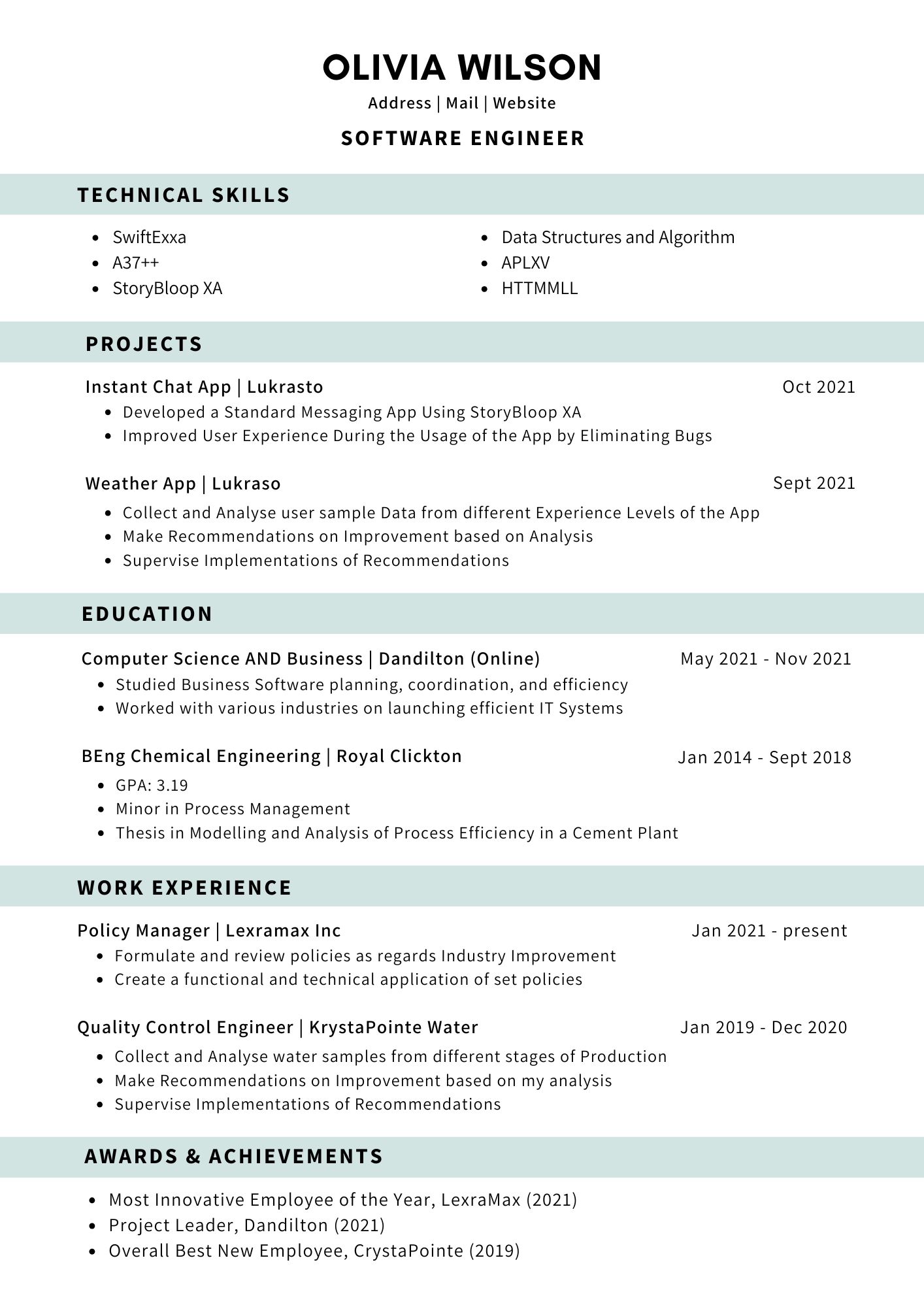
Clean Professional resume template
A plain single-column resume with shaded section headings and a two-column skills list — the safest choice in the library.
Access: Free to use and download. If you are not logged in, you are asked for an email address before the template opens. See plans.
| Layout | Single column |
|---|---|
| Photo area | No |
| Skills shown as | Plain list |
| Suits | Students and freshers, early career (0–3 years), mid-career |
| Suggested length | One page for most people; two if you have more than eight to ten years of relevant work. |
| Download format | PDF (image-based; text is not selectable) |
Who Clean Professional suits
- Freshers and engineering graduates — it has a separate Projects section above Education
- Applications uploaded to large company job portals
- Conservative fields: banking, accounts, government contractors, operations
- Anyone who wants the content, not the design, to do the work
What works well
- Everything reads top to bottom in one column, so nothing can be read out of order.
- Technical Skills sit in a compact two-column list near the top, which suits IT and engineering roles where the stack matters.
- Dates are right-aligned on the same line as each role, which keeps the left edge clean and easy to scan.
What to watch out for
- It looks deliberately understated. For design or marketing roles where presentation is part of the job, a more visual template may serve you better.
- The shaded heading bars use one accent colour; pick a muted shade with the colour picker if you are printing in black and white.
How this layout reads
Everything is in one column, read top to bottom. This is the most predictable layout for any reader — a person skimming, a printer, or software that pulls text out of a file — and it continues onto a second page cleanly.
Suggested section order
- Contact details and a one-line target role
- A two- or three-line summary
- Education (with CGPA or percentage if it helps)
- Projects and internships
- Skills
- Certifications, achievements and activities
You can hide any section you do not need in the builder.
Tips for this template
- Put Projects before Education only if your projects are stronger than your degree; otherwise hide the section or move your strongest project into Experience.
- Keep the skills list to what you could be questioned on in a technical round — eight to twelve items is plenty.
- Use the colour picker to change the accent colour; darker shades print more reliably.
When to choose a different template
- Choose Modern Bordered if you want the same simplicity with a little more personality (Free).
- Choose Emerald Executive if you have senior experience and want a key-achievements section (Pro).
Before you start
- Write or paste your content into a separate document first — the builder does not save your entries if you close the tab.
- Open the template, fill in each section and check the live preview beside the form.
- Download the PDF. If you are uploading to a job portal that reads your file, also prepare a text-based version (see formatting a resume software can read).
Questions about this template
Is Clean Professional free?
Free to use and download. If you are not logged in, you are asked for an email address before the template opens.
Does the downloaded PDF have selectable text?
No. The PDF download from our builder is image-based: it reproduces the design exactly, but the text cannot be selected or copied. That is fine for emailing a person or printing. For job portals that read the text out of your upload, keep a text-based copy of your resume as well, or type your details into the portal's form.
Is my resume saved if I close the page?
No. The builder works in your browser and does not save your entries to an account. Keep your text in a separate document and download the PDF before you close the tab.
Guides to read with this template
Ready to try Clean Professional?
Free to use and download. If you are not logged in, you are asked for an email address before the template opens.
Open this template Back to all templates